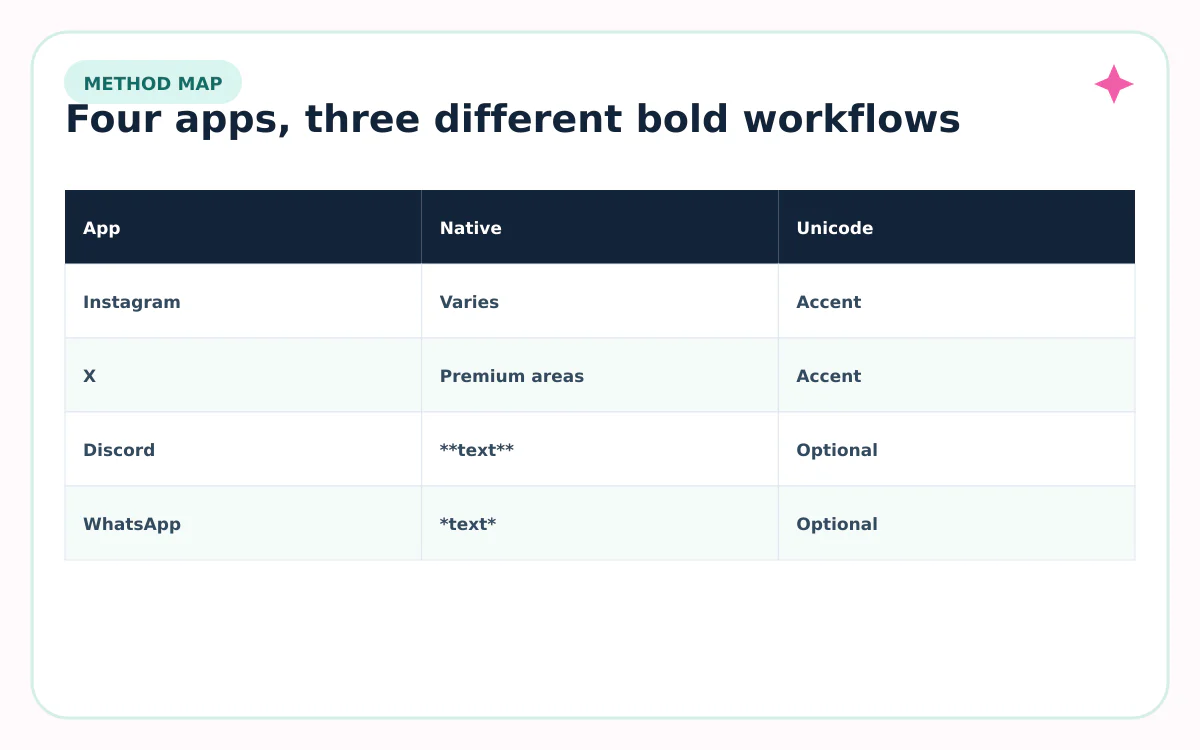
Bold text works differently on every app. WhatsApp and Discord have native formatting markers. X offers rich-text bold in supported Premium longer posts and Articles. Instagram’s ordinary profile and caption fields rely on the features available to that account or on Unicode characters for a copy-and-paste visual effect. Use the native method whenever it exists.
Last reviewed: August 31, 2026
Bold text methods on Instagram, X, Discord, and WhatsApp
| App or field | Native bold method | Unicode option |
|---|---|---|
| Instagram bio, name, caption | No universal Markdown marker | Use a short copy-and-paste accent |
| X standard post or bio | Field-dependent; standard text is usually plain | Use a short accent and protect @handles, #tags, links |
| X Premium longer post / Article | Rich-text bold is supported | Usually unnecessary |
| Discord message | Wrap text in **double asterisks** | Possible, but native Markdown is better |
| Discord About Me | Markdown is supported | Use lightly |
| WhatsApp message | Wrap text in *single asterisks* or use the format menu | Possible, but native formatting preserves letters |
How to make bold text on Instagram
- Write the final wording in plain text first.
- Keep your @username, hashtags, link, location, price, and key topic ordinary.
- Convert only a short label such as “NEW,” “START HERE,” or a two-word mood line.
- Paste it into the intended name, bio, or caption field.
- Preview on another phone and remove any missing or uneven characters.
A Unicode bold result such as 𝐍𝐄𝐖 𝐆𝐔𝐈𝐃𝐄 is copyable because those are separate mathematical alphanumeric symbols. It is not the same as selecting a bold weight in a text editor.
Instagram features can vary by account and product tier. If the app provides a native font or profile-style control for your field, prefer that option because it preserves ordinary characters.
How to make bold text on X and Discord
On X: X’s Premium guidance says longer posts can include rich text such as bold and italics. X Articles also support headings, bold, italics, lists, and other formatting. In ordinary fields without a bold control, a short Unicode accent can work, but do not style an @handle, hashtag, or URL.
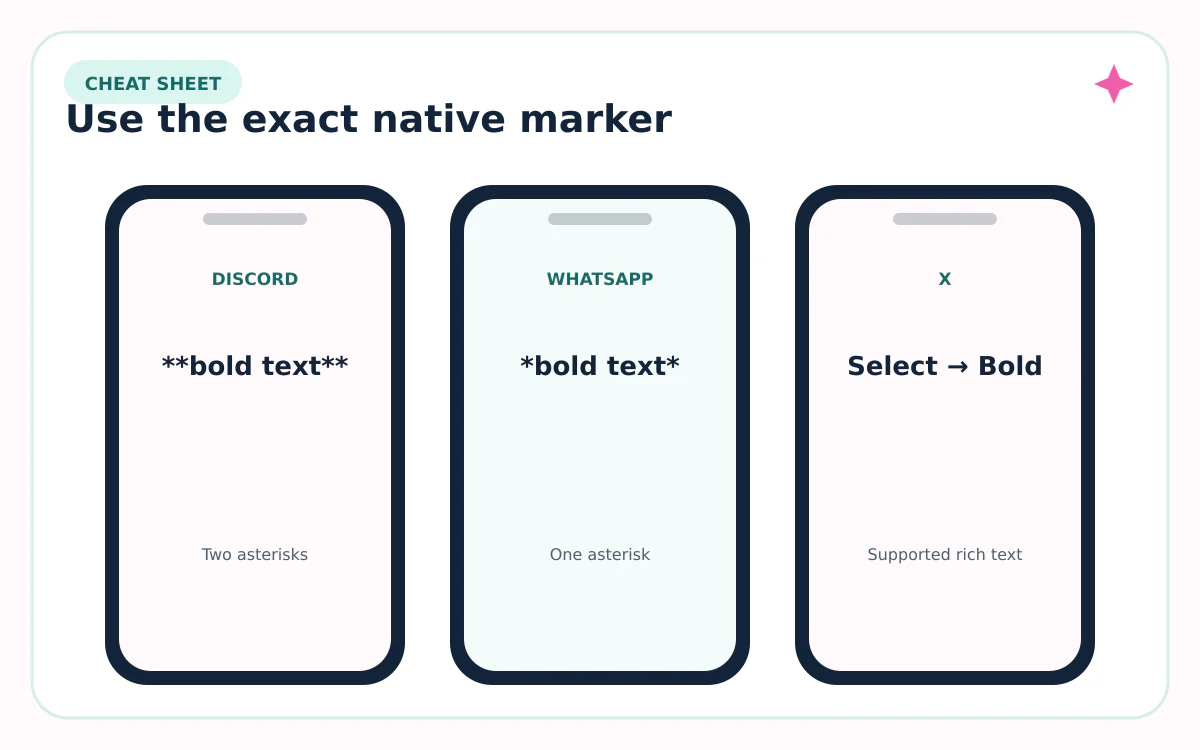
On Discord: wrap a message in two asterisks on each side: **bold text**. Discord’s Markdown guide documents that pattern. Its Custom Profiles guide says About Me supports Markdown, links, emojis, and Unicode within the profile limit.
| Goal | Type this | Result |
|---|---|---|
| Discord bold | **meeting at 7** | meeting at 7 shown bold |
| Discord bold italic | ***important*** | important shown bold italic |
| X supported rich text | Select text → Bold | Ordinary characters with bold formatting |
| X Unicode accent | 𝗡𝗘𝗪 𝗚𝗨𝗜𝗗𝗘 | Different Unicode characters |
How to make bold text on WhatsApp
Put one asterisk on each side of the text: *meeting at 7*. WhatsApp will render the words in bold after you send the message. You can also select text in the composer and choose Bold from the formatting menu on supported devices.
Do not add spaces between the asterisk and the first or last word. If the markers remain visible after sending, retype them with ordinary asterisks and check that both sides are present.
| Format | Markers | Example |
|---|---|---|
| Bold | *single asterisks* | *meeting at 7* |
| Italic | _underscores_ | _quick note_ |
| Strikethrough | ~tildes~ | ~old time~ |
| Monospace | “`three backticks“` | “`code or label“` |
When to use native bold and when Unicode bold is acceptable
| Question | Native formatting | Unicode bold |
|---|---|---|
| Underlying characters | Ordinary letters | Substituted symbols |
| Search and copy | Usually preserved | Can differ |
| Screen readers | More predictable | May announce symbol names or behave unexpectedly |
| Works between apps | Formatting may not travel | Characters usually travel if supported |
| Best use | Messages and documents | One short visual accent |
Use native formatting for instructions, conversations, professional text, and anything people must find or quote. Use Unicode bold only when the destination has no styling control and the phrase is short, non-essential, and paste-tested.
If accessibility or search matters, repeat the meaning in ordinary text. For example: “𝗡𝗘𝗪 — Read the September guide” keeps the key content available even if the decorative word is announced poorly.
Sources reviewed
Platform features and character rules can change. We checked the first-party and standards sources below on August 31, 2026.
Frequently asked questions
What symbols make text bold on WhatsApp?
Wrap the words in one asterisk on each side, such as *meeting at 7*. WhatsApp also offers a formatting menu on supported devices.
How do I bold a Discord message?
Use two asterisks on each side: **bold text**. Discord documents this as its native Markdown pattern.
Can I make normal X posts bold?
Rich-text controls are available in supported Premium longer-post and Article workflows. For fields without the control, Unicode is a visual workaround, not native formatting.
Does Instagram have a bold Markdown code?
Instagram does not use the Discord or WhatsApp marker patterns as a universal profile-and-caption bold command. Use available native style controls or a short Unicode accent.
Is Unicode bold accessible?
Not reliably. It replaces ordinary letters with symbols that can affect pronunciation, search, copying, and rendering. Keep essential information in plain text.